- After selecting a carrier for a package, the following is displayed:
- Number of available plans
- Group By Carrier
- This applies to the plans shown in the grid, along with any filters or sorts that have been used.
- List of available plans

- Use different options to refine the listed plans (search, more column options, sorting, and filtering).
- The search, sort, and filters work together to identify the displayed plans.
- Multiple filters can be used, but only one sort is permitted.
- Note: The default sort is by lowest to highest Total Premium and remains along with other sorts.
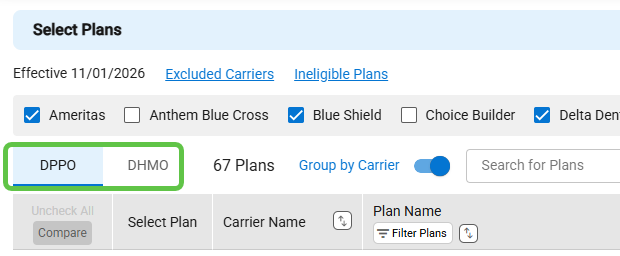
- The Dental Select Plans panel now provides separate tabs for DPPO and DHMO. – New
- Each tab displays the applicable columns.
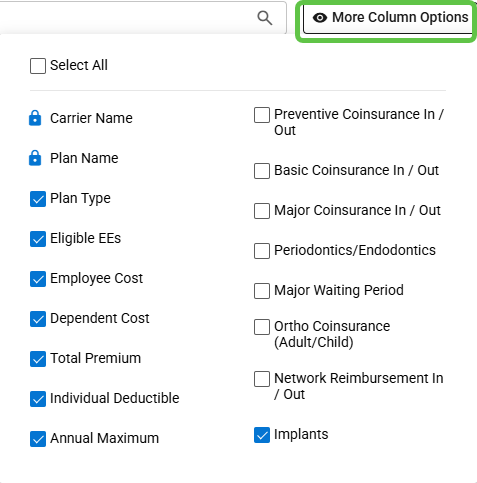
- Use the More Column Options to add additional columns to the DPPO and DHMO tabs. – New
- DPPO available columns:
- DHMO available columns:
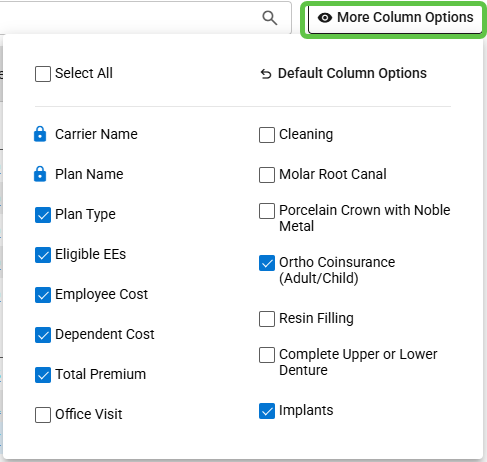
- Several column labels have been updated.
